◈How2GetIt.Find your game ↗
WHERE & HOW TO FARM

Buy Construction Materials at a General Store

A General Store at an outpost in A0, B4, C2, or Z3.

SEE WHERE TO GO

Maps & farm layouts

1 map

Drag to pan. Zoom in to read labels and markers.
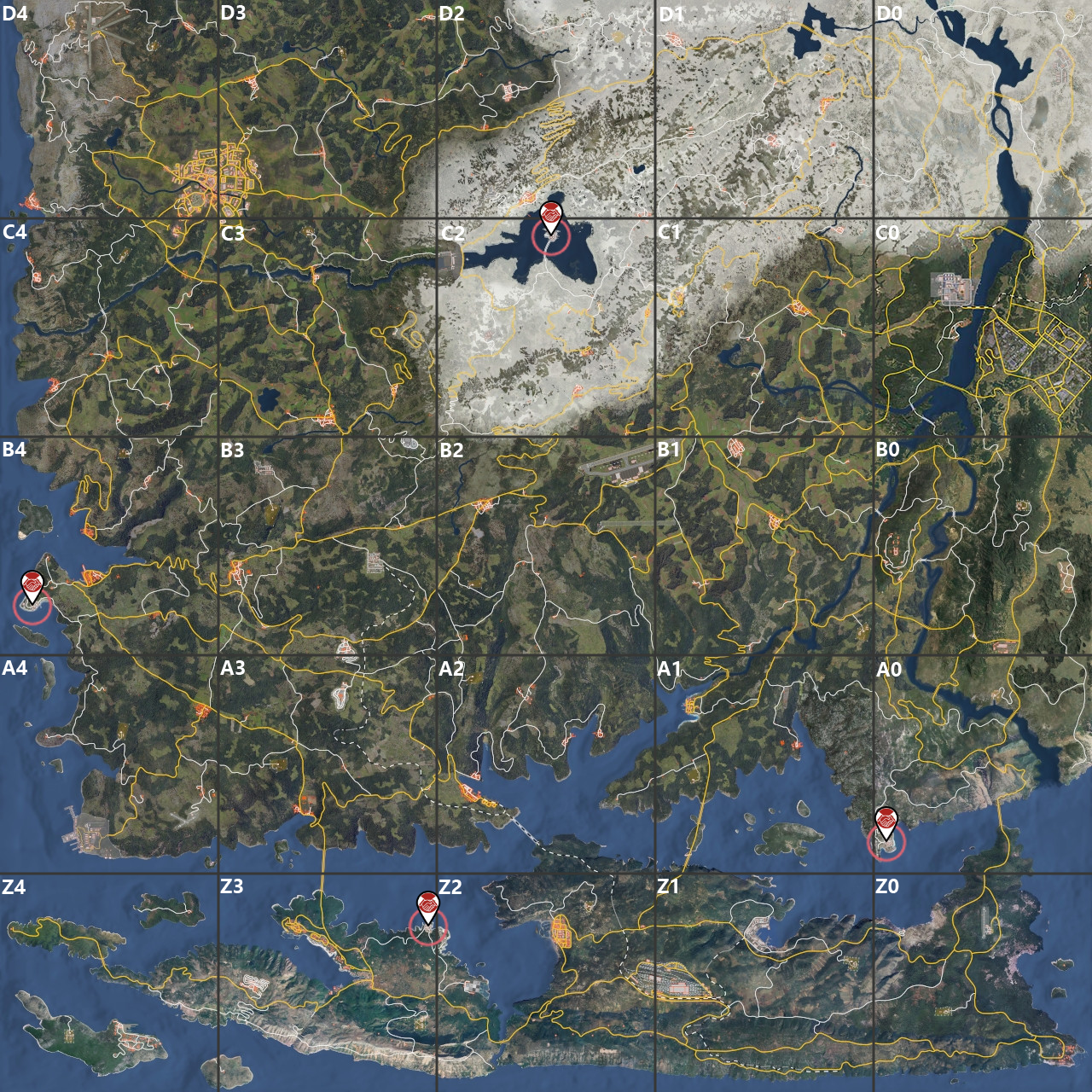
The four trader outposts are marked in A0, B4, C2 and Z3. Choose a General Store for goods or a Mechanic for vehicle parts; check live stock when you arrive.

Before you go

Farming steps

  1. List the exact materials required for your next blueprint before leaving base.
  2. Travel to an outpost and interact with its General Store trader.
  3. Open the buy menu and inspect the current material listings at that store.
  4. Compare available stock with your list and add only the needed items to the cart.
  5. Review the cost against your funds, then confirm the purchase.
  6. Transfer purchased goods from the temporary depot to your inventory.
  7. Carry the materials back to your base and use them for the planned construction or store them safely.

Repeat, collect and use

Repeat for each shortage when a trader has suitable stock and you can afford the purchase. Availability is variable, not a fixed industrial loot yield.

Common mistakes

  • Assuming every store carries a particular material can waste the trip; inspect the menu before committing to a purchase.
  • Buying without checking blueprint requirements can leave you short of the actual bottleneck; plan the recipe first.
  • Forgetting to transfer goods out of the temporary depot leaves them behind; move purchases into inventory.

When to stop or switch

Stop when the planned material list is covered or the trader lacks the items; switch to another supply method if another outpost trip is not worthwhile.

Sources & fact checks

What you can get here

Open a guide to find other locations and see what the item is used for.