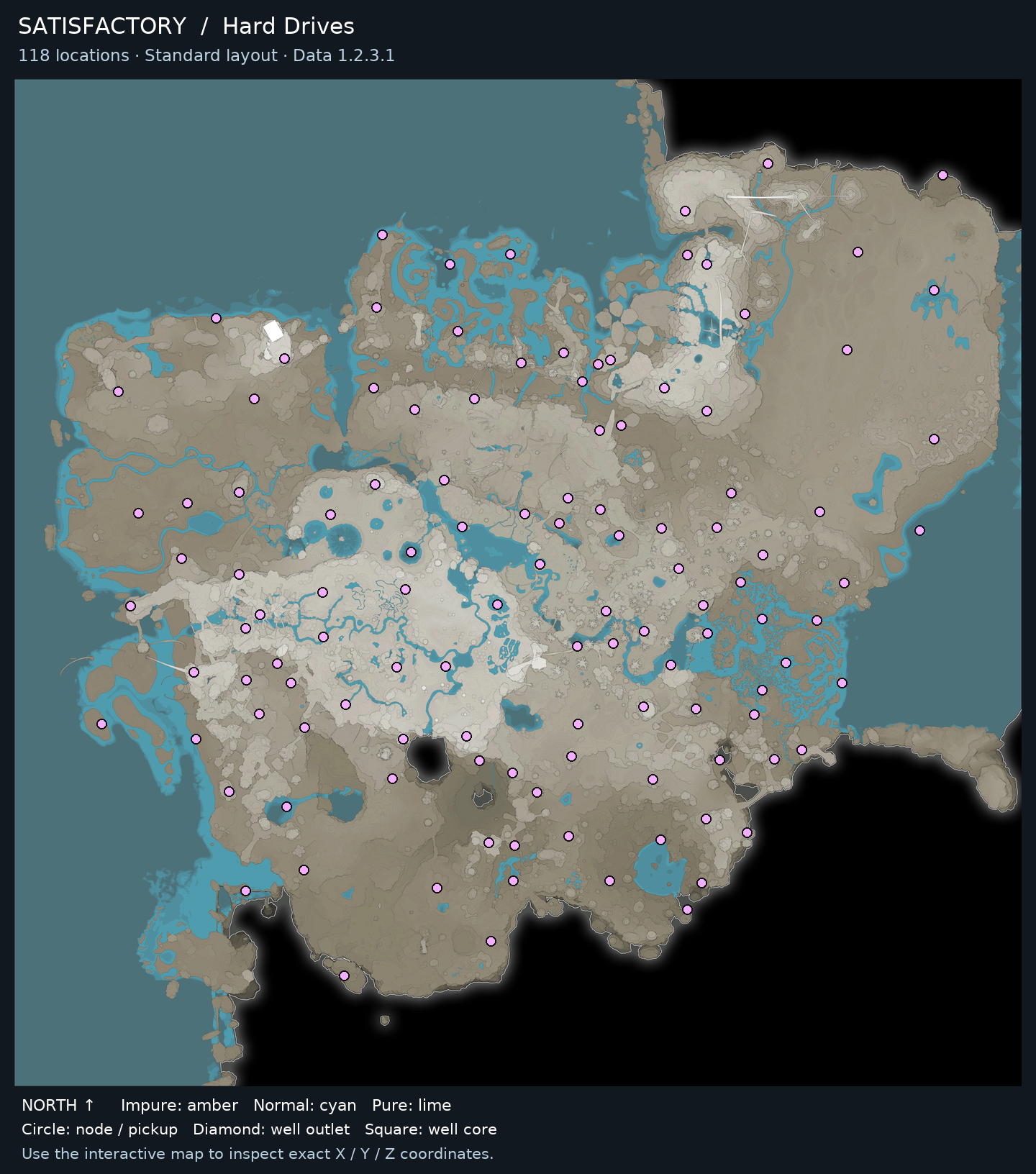
Use the on-page interactive map to find crash sites: select Hard Drives to show all 118 markers in the standard layout snapshot.
1.2 · Standard resource layout · Data 1.2.3.1
WHERE & HOW TO FARM
Hard Drive acquisition
On the on-page interactive map, select Hard Drives. Markers identify crash sites and show coordinates and recorded repair requirements. In the game, check the pod’s surroundings,…
Use the on-page interactive map to find crash sites: select Hard Drives to show all 118 markers in the standard layout snapshot. Select a marker to see its XYZ coordinates in meters and any recorded item or power requirements. Treat each marker as a drop pod to investigate, not a free Hard Drive pickup. At the site, inspect the pod, meet its listed requirements, and recover the drive. Then take it to the MAM, research it, and choose from the recipe options the game presents. The map can help you plan what to investigate, but it does not record which sites you have collected.
Filter a resource, then select a marker or location below for its purity, elevation and coordinates. The map is hosted here.
Standard resource types and purity · Game-data snapshot 1.2.3.1. Randomized worlds differ. Nearby markers may be separated by cliffs or caves.
118 Hard Drives locations
Hard Drives locations · Select a marker to inspect its coordinates.
● Impure: amber● Normal: cyan● Pure: lime◆ Well outlet■ Well core
GET STARTED
How to farm
On the on-page interactive map, select Hard Drives. Markers identify crash sites and show coordinates and recorded repair requirements. In the game, check the pod’s surroundings, elevation, cave access, and hazards before approaching.
Before you go
Access to the on-page interactive map.
Ability to reach the marked crash site in-game.
Any items or electrical power specified for that particular drop pod.
The MAM to research a recovered Hard Drive.
Open the interactive map and select Hard Drives to display the crash site markers.
Choose a marker and note its XYZ coordinates and any listed item or power requirements.
Travel to the coordinates in-game, checking the terrain, elevation, possible cave access, and nearby hazards as you approach.
Inspect the crashed pod and confirm its actual requirements before trying to open it.
Provide the required items and/or electrical power for that site, then recover the Hard Drive when the pod allows it.
Bring the recovered drive to the MAM, start its research, and select one of the recipe options offered by the game.
Farming tips
Use the marker coordinates as a destination reference; the map does not provide a tested terrain route or travel time.
Check a pod’s requirements before setting out so you can bring the needed items or plan for power.
Keep your own note of recovered sites, since the map does not track collected state.
Explore carefully around markers: a site may be affected by elevation, cave access, or hazards.
Repeat, collect and use
Repeat the map-to-pod process at another marked site whenever you want to search for more Hard Drives. Each placed crash site is a one-time recovery.
Common mistakes
Assuming every marker is a free pickup; some pods require specific items, electrical power, or both.
Treating map markers as a collection tracker; the site does not show which Hard Drives you have already recovered.
When to stop or switch
Stop searching a particular crash site once you have recovered its Hard Drive; placed sites are one-time recoveries. Continue at another marker if you want to hunt for more drives.
On the on-page interactive map, select Hard Drives. Markers identify crash sites and show coordinates and recorded repair requirements. In the game, check the pod’s surroundings, elevation, cave access, and hazards before approaching.
Access to the on-page interactive map.
Ability to reach the marked crash site in-game.
Any items or electrical power specified for that particular drop pod.
The MAM to research a recovered Hard Drive.
Rate not listed
Related guides
More guides for gathering materials and making progress.