Outpost traders can fill a specific food or garden-supply gap when your own harvest and scavenging do not cover it.
PC / Global, 1.0 released June 17, 2025
WHERE & HOW TO FARM
Where to farm
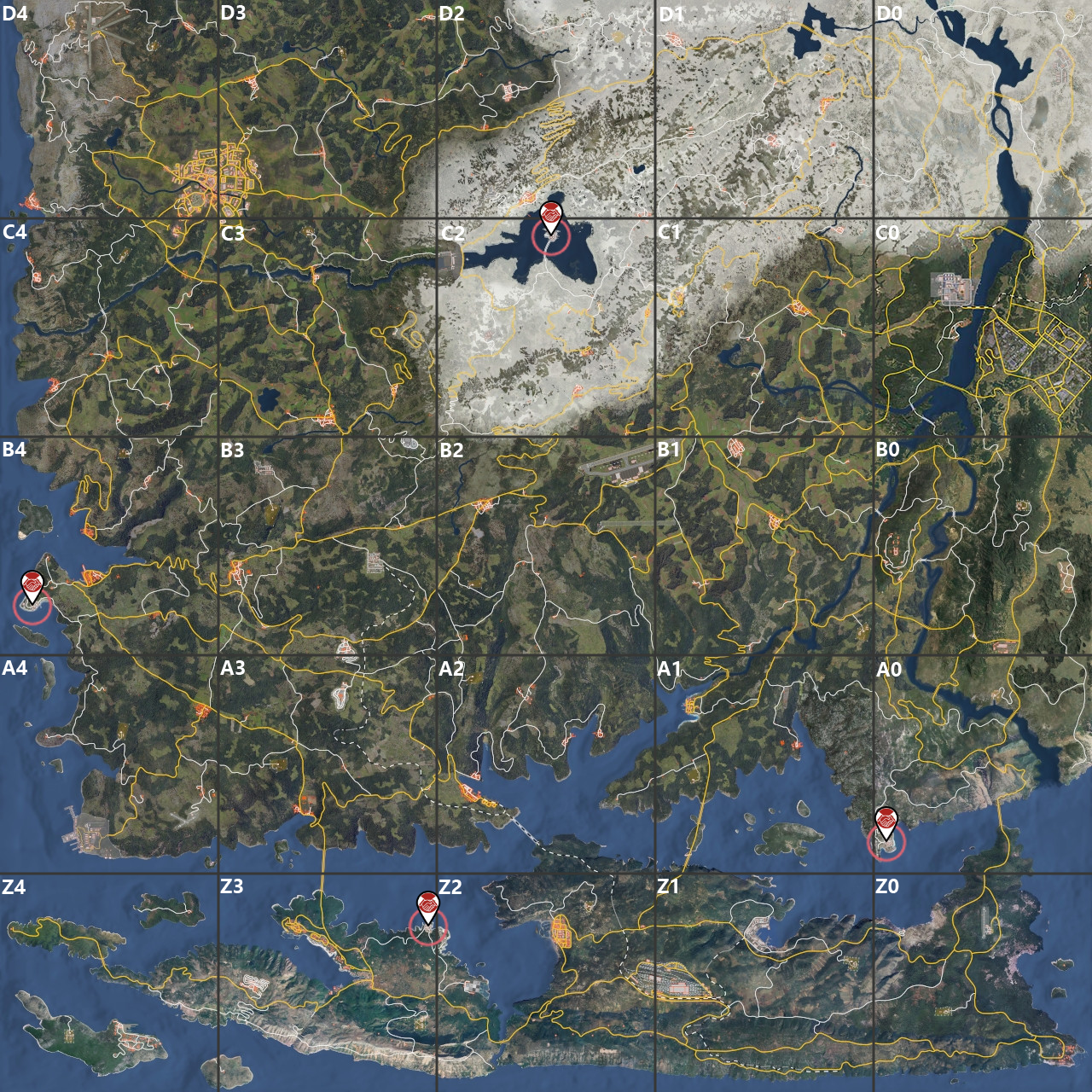
An outpost in A0, B4, C2, or Z3. Use a General Store for general goods and food; trader stock differs by location.
Treat trader stock as a live opportunity rather than a guaranteed supply list. General Stores sell general goods, materials, and food, but availability and economy vary between outposts and traders. Check the exact item and your available funds before committing to the trip.
The four trader outposts are marked in A0, B4, C2 and Z3. Choose a General Store for goods or a Mechanic for vehicle parts; check live stock when you arrive.
GET STARTED
How to farm
Before you go
Cash or saleable surplus.
Inventory capacity for the planned purchase.
A route to an outpost that is accessible under your server's conditions.
Before traveling, decide which food or farming item you actually need and check that you have enough space to carry it.
At an outpost, interact with the relevant trader and open the buy menu.
Inspect the current listing for the exact item; do not assume that seeds or a particular supply are in stock.
Add available items to the cart and review the displayed cost before confirming the purchase.
Complete the transaction, then transfer the goods from the temporary depot into your inventory.
If you need funds, check the sell menu for surplus items and the trader's current buying conditions.
Return to your plot or storage and use or store the purchase so it supports the next planting or food run.
Farming tips
Check stock where you are before buying a substitute; trader inventories and economies can vary.
Make a short shopping list so a changing assortment does not turn into an unnecessary gear run.
Repeat, collect and use
Repeat whenever you need supplies and a trader has them available. Purchases are limited by current stock, your funds, and trader conditions; restock is not guaranteed on a schedule.
Common mistakes
Traveling for an unverified item can waste a trip; check the live buy menu first.
Spending all cash on optional goods can leave no funds for urgent needs; prioritize the specific shortage.
Leaving items in the temporary depot means they are not carried home; transfer purchases before exiting the trade screen.
When to stop or switch
Stop shopping when the required items are in your inventory or stock is unavailable; switch to another outpost or a self-supply method only if the extra trip is worthwhile.